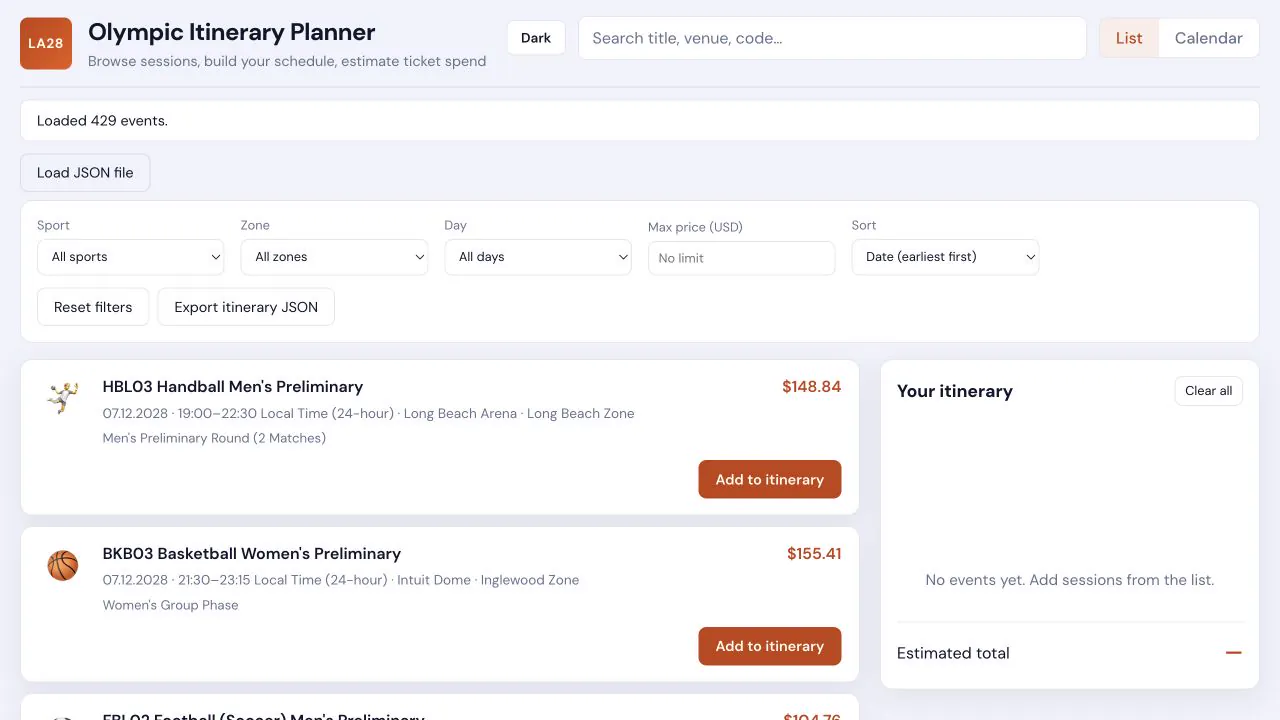
A pair of static HTML/CSS/JavaScript planners for the 2028 Los Angeles Olympics, built on ticket and schedule data that had to be extracted before it could be planned against. A Python script reads screenshots of the official LA28 Olympic Games Tickets listing page through an OpenAI vision model and writes strict-schema JSON; a Node script does the same job from a pasted text dump. The browser apps then let you search, filter, sort, browse a month calendar, build an itinerary, and see an estimated total from listed starting prices. Everything runs client-side: selections live in localStorage and export as JSON you can hand to someone else.
What it is
A static HTML / CSS / JavaScript app. It reads ticket rows from tickets/extracted_tickets.json (produced by script_code/extract_tickets.py) and lets you search, filter, sort, browse a month calendar, build an itinerary, and see an estimated total from listed starting prices.
The header sums up the job in one line: browse sessions, build your schedule, estimate ticket spend. A second build in branch/random splits the same idea into two pages — a family trip calendar driven by the published competition schedule, and a priced-listings browser driven by the ticket shop data.
Nothing is served from a backend. Both builds fetch a JSON file, keep your picks in localStorage, and hand you a JSON download when you want to share the plan.
Getting the data out of a ticket site
The hard part was never the calendar — it was that 429 priced sessions only existed as pages of a ticket shop. extract_tickets.py solves it with vision: "Extract LA28 Olympic ticket rows from screenshots using OpenAI vision + structured JSON. Uses the Responses API with multimodal input (text + image) and strict json_schema output."
The prompt is deliberately narrow: "You extract structured data from screenshots of the official LA28 Olympic Games Tickets listing page. Each visible card/row usually has: a code + sport title line, a description line, a line with date | time | venue | zone, and a starting price. Copy text faithfully. If a field is missing or unreadable, use empty string for strings and null for price_amount when unknown. Include every ticket row fully visible in the image; do not invent rows beyond what is shown."
A strict JSON Schema (schema.py) pins every row to event code, title, description, date, local time, venue, zone, display price, numeric price, and currency. The runner retries with exponential backoff, stamps each row with its source image, de-duplicates across pages, and rewrites a .partial file after every image so a long run can be watched or salvaged. The committed output records the run: 22 screenshots in, 429 ticket rows out, model gpt-4o — and the de-duplication found nothing to drop that time (429 raw rows, 429 unique).
branch/random takes a second route to the same destination. build-tickets-json.mjs is a one-off Node parser — "parse data/raw_data.txt → data/la28-ticket-listings.json" — that regex-splits a pasted text dump of the shop into 337 unique events with ISO dates, venue/zone split on the pipe, a parsed starting price in USD, and the original tickets.la28.org link.
Two ways to plan the trip
The main planner is a list/calendar toggle over the extracted rows. Filters cover sport, zone, day and a maximum price; six sort orders cover date, price and title; search matches title, code, venue, zone, description and time. Sessions get an emoji from the first three letters of their event code, falling back to a keyword match on the title. Days with sessions are counted on a month grid, and clicking a day filters the list to it. The itinerary panel groups picks by date, saves them under the localStorage key la28-itinerary-v1, and totals the listed prices with an honest caveat: "Sum of listed starting prices only; not an official quote." There is a light/dark toggle, a JSON export of just the selected events, and a Load JSON file fallback for when fetch is blocked.
The family trip calendar in branch/random starts from the trip instead of the catalogue: "Set your arrival and departure — everything outside that window disappears." The two date fields open on 14–30 July 2028 and are clamped to the Games window (10 July to 15 August 2028). It renders only the sports the family actually discussed — track and field, lacrosse, swimming, equestrian, beach volleyball, artistic swimming, water polo, climbing, sailing, rhythmic, triathlon — as a colour-coded Sun-first grid of the trip's days, with a Colors legend tucked into a details panel. The equestrian filter is opinionated by design: eventing (EQU01–EQU05) and jumping (EQU13–EQU16) are shown, and "Pure dressage sessions (EQU06–EQU12) are hidden on purpose." Tap a session to shortlist it, flip the radio from "All sessions in your trip dates" to "Only what I tapped (my list)" to see just the shortlist, use the quick-add buttons for the known must-sees, then download the picks as JSON with a name and notes attached.
The third page browses every priced listing: "Search and filter, add sessions to My itinerary, and see codes, venues, and starting prices. Selections save in this browser." It groups by date by default, sorts lowest or highest price on request, and totals the shortlist as a sum of "from" prices — again labelled as "Not a checkout total — starting prices only."
Laptop-first, phone-friendly
The stylesheet states its own brief on line one: "LA28 Itinerary Planner — laptop-first, responsive". On a wide screen the planner is a two-column grid — the event list on the left, a 380px itinerary rail held at the right. Below 1100px the grid collapses to a single column, the rail turns into a bottom sheet that slides up from a floating Itinerary button carrying a live count, and the filter row folds behind a Filters toggle.
It ships dark-first — a deep navy ground with an amber accent — with a light theme (white cards, burnt-orange accent) supplied by an html[data-theme="light"] override. An inline script in the head reads the la28-theme key out of localStorage before the page paints, falling back to the system prefers-color-scheme, so the toggle never flashes the wrong theme. A status banner under the header reports how many events loaded, and switches to a warning when the payload's own meta says not every screenshot was processed.